![Holistiplan Logo (800x200 px).webp]](https://help.holistiplan.com/hs-fs/hubfs/Holistiplan%20Logo%20(800x200%20px).webp?width=160&height=40&name=Holistiplan%20Logo%20(800x200%20px).webp)
Nonqualified Annuities
Before annuitization, nonqualified annuities are usually taxed on a last-in, first-out (LIFO) basis. Earnings come out first and are taxed as ordinary income. Once all the gains are distributed, the rest is a tax-free return of basis. After annuitization, when regular payments begin, the IRS uses an exclusion ratio to divide each payment between taxable earnings and tax-free return of principal.
The most accurate way to model a nonqualified annuity is to enter the expected annual distributions as Custom Income.
Annuitized Nonqualified Annuities
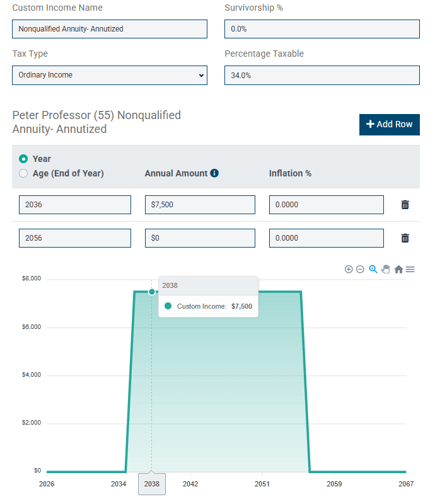
- Add the expected annual payment as Custom Income.
- Set Tax Type to Ordinary Income.
- In Percentage Taxable, enter the taxable portion of each payment, which is 100% minus the exclusion ratio.
Example: The clients invested $100,000 in a nonqualified annuity. When they annuitize it in 2036, it’s worth $150,000, and they’ll receive payments over 20 years. The exclusion ratio is 66%, so 66% of each payment is excluded from tax and 34% is taxable. Enter 34% in Percentage Taxable.
Nonqualified Annuities Before Annuitization
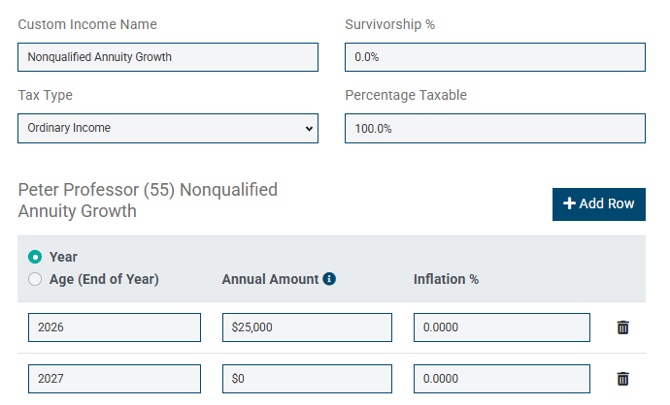
- Add the expected annual distributions as Custom Income, up through the year the gains are fully distributed.
- Set Tax Type to Ordinary Income.
- Set Percentage Taxable to 100%.
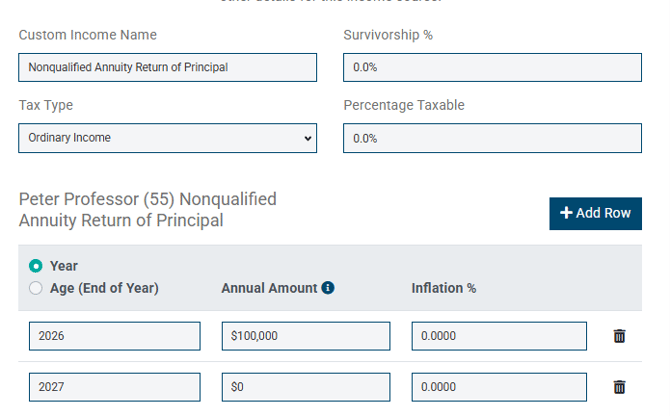
- Add a second Custom Income entry for the distributions after that, which are a return of principal.
- Set Percentage Taxable on the second entry to 0%.
Example: The clients invested $100,000 in a nonqualified annuity and cash it out in one year, when it’s worth $125,000. The $25,000 of growth is taxable as ordinary income. The $100,000 they originally invested is a return of principal and isn’t taxed.
Enter the growth as taxable income:
Enter the return of principal as non-taxable:
Do not include nonqualified annuity income as part of the taxable asset balance. Distributions from taxable assets are modeled as long-term capital gains subject to capital gains tax, and nonqualified annuity distributions are subject to ordinary income tax.
Qualified Annuities
Qualified annuities are funded with pre-tax dollars, so distributions are fully taxable when withdrawn. Qualified annuities are also subject to required minimum distribution (RMD) rules. The Roth Projection Tool has two main ways to model them.
Option 1: Include in Tax-Deferred Assets
- Add the annuity value to the client’s tax-deferred assets.
- If the client has annuitized and is receiving payments, add the annual payment as a Planned Distribution in the tax-deferred assets section.
- Set the Planned Distribution to stop at the client’s RMD age.
Please note the following details:
- Stopping the Planned Distribution at RMD age prevents double-counting. Without a stop age, the projection distributes both the calculated RMD and the planned amount.
- Each Planned Distribution reduces the tax-deferred assets by the annual amount.
- Once RMDs begin, the annuity value is included in the RMD calculation.
- The annuity value counts as part of the tax-deferred assets, so the projection treats it as available for Roth conversions.
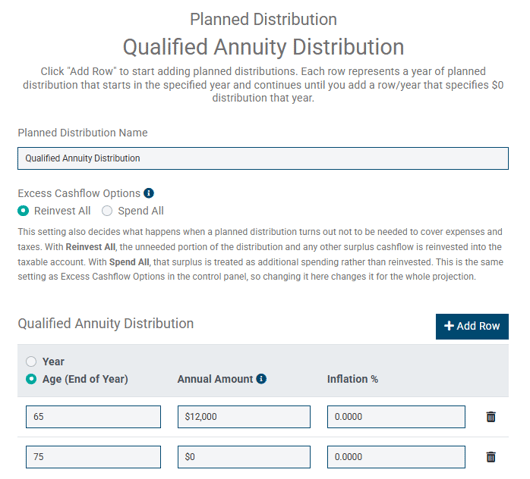
Example: A client plans to take $12,000 a year from a qualified annuity starting at age 65, and their RMDs begin at 75.
- Add the annuity balance to the tax-deferred assets.
- Add a Planned Distribution of $12,000 a year, starting at age 65.
- Set the Planned Distribution to stop at age 75.
The projection models the $12,000 distributions from age 65 to 75, then uses the annuity balance as part of the tax-deferred assets to calculate RMDs. Without the stop age, the client would show both the RMD and an extra $12,000 coming out each year.
Option 2: Model as Custom Income
Modeling the annuity as Custom Income keeps it separate from the client’s other tax-deferred assets. The annuity isn’t treated as an asset available for Roth conversion, but this method takes more manual data entry once distributions begin.
- Leave the annuity balance out of the tax-deferred assets.
- Add the expected annual distribution as Custom Income.
- Set Tax Type to Ordinary Income.
- Set Percentage Taxable to 100%.
- Add a second Custom Income entry for the estimated distributions once RMDs begin.
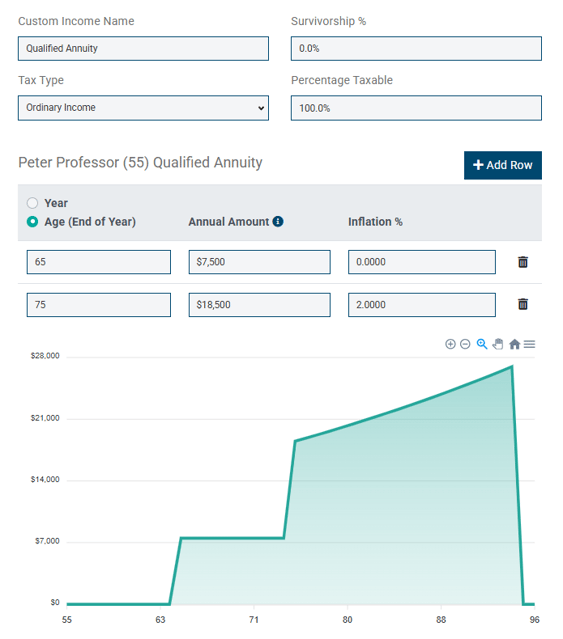
Example: A client plans to take $12,000 a year from a qualified annuity starting at age 65. At 75, when RMDs begin, the distribution needed to satisfy the annuity’s RMD is estimated at $18,500, increasing 2% a year.
- Leave the annuity balance out of the tax-deferred assets.
- Add a Custom Income entry of $12,000 a year, from age 65 to 74.
- Add a second Custom Income entry of $18,500 a year, starting at age 75, with a 2% annual increase.
- Set Tax Type to Ordinary Income and Percentage Taxable to 100% on both entries.