![Holistiplan Logo (800x200 px).webp]](https://help.holistiplan.com/hs-fs/hubfs/Holistiplan%20Logo%20(800x200%20px).webp?width=160&height=40&name=Holistiplan%20Logo%20(800x200%20px).webp)
Holistiplan has identified several conversation-worthy milestones that may apply to your clients. You can easily see which one of these milestones is coming up for your clients in a few different ways, including your Home page, the Households Screen, or the Age Reminders Page.
Dashboard (Home Page)
The bottom of the Home Page has a list of your clients with upcoming age reminders. The default range is 30 days out from the current day, but Premium subscribers can change the filter from the default range to another time frame if they wish.
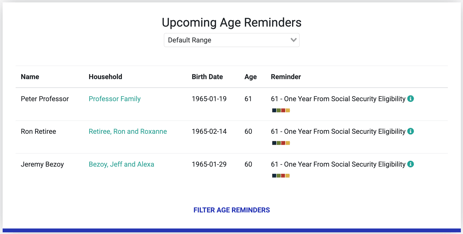
Click on the (i) information bubble next to each item to get more details on that particular age reminder and how it may lead to a planning opportunity discussion with your clients.
Households Screen
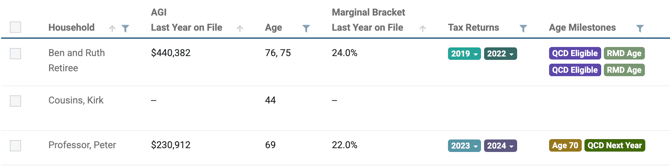
Age milestone reminder icons can be found in the Age Milestones column of the Households screen. You can filter that column within the Households page, as well as get some information by hovering on an individual milestone badge.
Age Reminders Page
Premium subscribers can view all of the Age Milestones for your clients in one spot by navigating to the Age Reminders Page (Tools & Resources > Age Reminders).

Data will not be populated on this page until start and end dates have been set or a preset time frame is selected.
Premium Subscribers can also update their age reminder digest preferences to receive email reminders of upcoming milestones for their clients on this page. To find out more about how to enable this feature, check out our article here on how to set up the Age Reminder Digest.
Once a date range is selected, age reminders populate as applicable. In this case, we've used the "Next Month" quick filter to show clients who have age milestones coming up in the next year. These milestones can be filtered by name, household, birth date, age, specific type of milestone reminder, trigger date, and advisor.
Click on the window tab icon next to the reminder in the Reminder column to get additional context on that age milestone. In the example above, this additional information is displayed for Ron's "Age 60 - One Year From Social Security Eligibility" milestone.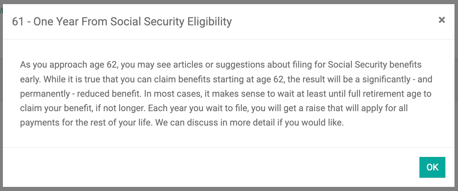
If you have enabled the fpPathfinder integration, you will see links to relevant flow charts related to that milestone and any associated decisions and discussions.