![Holistiplan Logo (800x200 px).webp]](https://help.holistiplan.com/hs-fs/hubfs/Holistiplan%20Logo%20(800x200%20px).webp?width=160&height=40&name=Holistiplan%20Logo%20(800x200%20px).webp)
A feature gone mostly unnoticed, but remains important nonetheless, is the ability to add users as team members for a client. If an advisor has other colleagues working on a specific client with them, we've created a way to recognize those members by looking at the client's household screen.
This feature also comes in handy when opting into our Age Reminders Digest, a weekly email feature available to our Premium subscribers.
To add users to a team, open the client's Household page. In the Household > Details section, users can assign the Primary Advisor assigned to the client and add multiple team members. 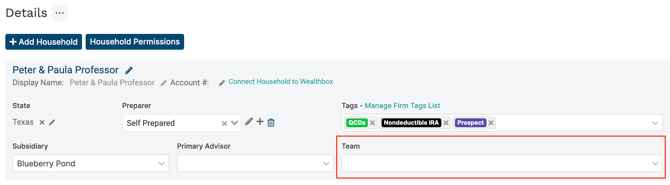
The Primary Advisor and Team fields do not impact household access. To grant a different advisor/user access to a household, contact your Firm Admin.
It is not currently possible to batch assign or unassign multiple households to advisors or teams.