![Holistiplan Logo (800x200 px).webp]](https://help.holistiplan.com/hs-fs/hubfs/Holistiplan%20Logo%20(800x200%20px).webp?width=160&height=40&name=Holistiplan%20Logo%20(800x200%20px).webp)
Creating a Household Note:
To create a note, navigate to the desired household and select the Notes section under Household, as shown below. Then click Create Note to add a new note.
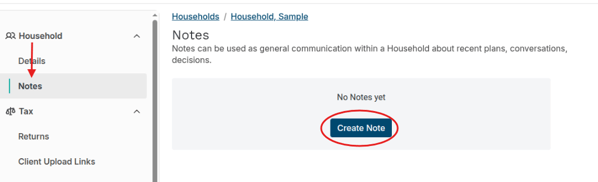
Once this is selected, complete the options for Note Title and make sure the correct category is selected. You can then add the note at the bottom and then select "Create".
Firm Admin can create different Note Categories under Settings > Customization. When a category is deleted, all associated items move back to "General".
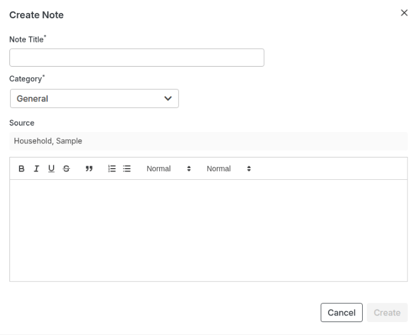
Once created, any user who has access to the household will be able to edit and view the note and make comments.
Viewing Household Notes and Add a Comment:
Notes can be viewed using the steps above, but on the Household Notes page, any available notes will be listed. You can select the Open option to view the note.
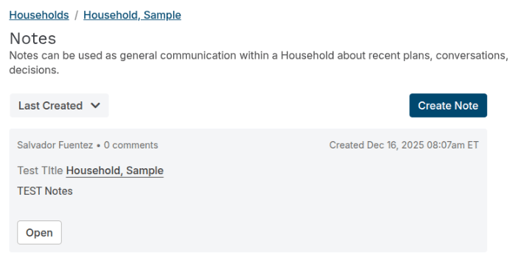
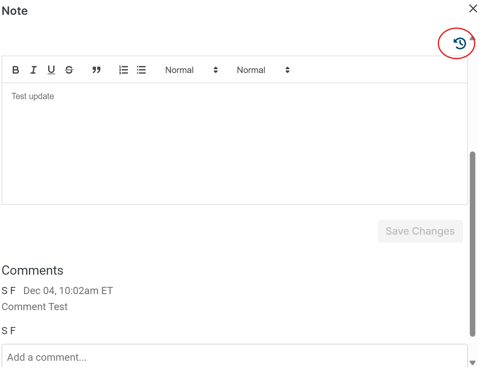
From the Note page that opens, users can edit the note itself, and they can view or add comments at the bottom(as seen below). Please be aware that any comments added cannot be edited or deleted. Edits made to the note can be viewed by selecting the Note History button. This option (circled in red) is located right above the note on the right-hand side.
We will be adding Note functionality to other reports and pages within the software in future iterations.