![Holistiplan Logo (800x200 px).webp]](https://help.holistiplan.com/hs-fs/hubfs/Holistiplan%20Logo%20(800x200%20px).webp?width=160&height=40&name=Holistiplan%20Logo%20(800x200%20px).webp)
Use this section to model the impact of different filing statuses, to indicate when a taxpayer is eligible for additional amounts to the standard deduction for age (over age 65) and blindness, and to indicate the number of dependents for calculation of the Child Tax Credit and Credit for Other Dependents.
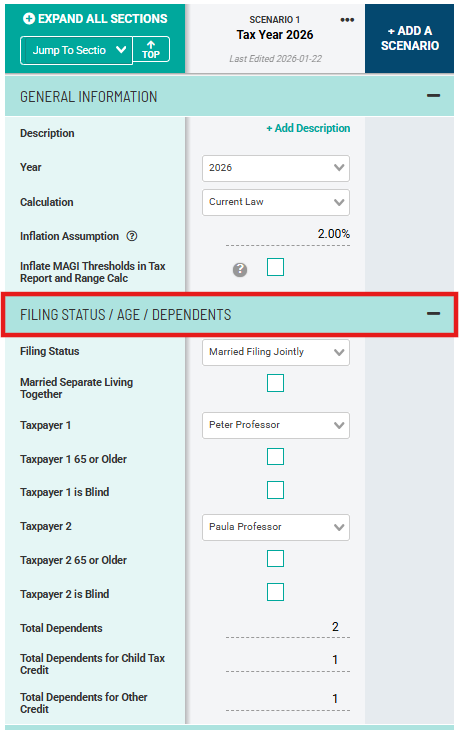
Filing Status
From the Filing Status dropdown, you can select the appropriate filing status for the taxpayer(s) in a given year. For those Married Filing Separate, you can also indicate if the taxpayers lived together at any point during the year by checking the "Married Separate Living Together" checkbox. This is important because married taxpayers who file separately and live together at any point during the year may be ineligible for certain deductions and credits, and have differing IRMAA brackets for Medicare premiums.
Age/Blindness and the Additional Standard Deduction
Taxpayers who are 65 or older during the tax year, or who are legally blind, are eligible for an Additional Standard Deduction. To indicate either, check the appropriate checkbox as shown above. Holistiplan will then add to the Standard Deduction amount for the selected individual.
Dependents
Holistiplan will automatically calculate certain credits, like the Child Tax Credit or Credit for Other Dependents, based on the entered number of dependents. Indicate the total number of dependents on the Total Dependents line. Then indicate whether those dependents are a qualifying child for the Child Tax Credit or qualify as a dependent for the Credit for Other Dependents. In the example above, the taxpayers have two total dependents, one of which is considered a qualifying child and the other a dependent for the credit for other dependents.
Note that the number of dependents entered as Total Dependents for Child Tax Credit and Total Dependents for Other Credit should be added together and will equal the amount entered as Total Dependents.