![Holistiplan Logo (800x200 px).webp]](https://help.holistiplan.com/hs-fs/hubfs/Holistiplan%20Logo%20(800x200%20px).webp?width=160&height=40&name=Holistiplan%20Logo%20(800x200%20px).webp)
We recognize that for a number of reasons, households exist in Holistiplan that have only been touched once, or there are no plans to touch again anytime soon. Make sure those don’t count towards the Billable Household limit in the next subscription period without having to delete the households entirely.
Setting a Household as read-only before the firm is billed for the annual renewal removes the household from being counted as a Billable Household at renewal. Deleted and read-only households will impact Current Active Households. Read more about how household usage is calculated in this article.
Households can be made read-only or reactivated all at once on the All Households page. Select the households to change and, from the Select Action dropdown bar, choose Set to Active/Read-Only, then the teal Bulk Update button. 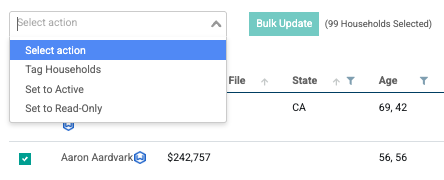
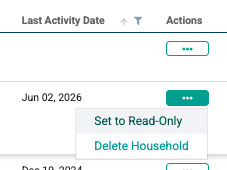
To set as read-only/reactivate a single household on the All Households page, click Actions next to the client in question and select Set to Read-Only/Activate Household. You can also delete a household here, but note that deleting a household will delete all information for said household entirely.
Individual households can also be deactivated in the client's Household screen by clicking Details and selecting Set to Read-Only on the right side of the screen.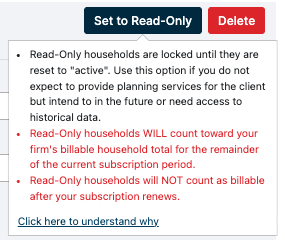
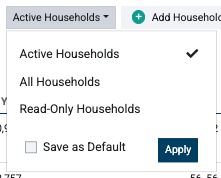
Setting a household as read-only will produce a read-only tag for that household on the All Households screen. However, the All Households screen is set to only show active households by default. Click on the dropdown next to the Search option and select Read-Only Households or All Households to view read-only households on this screen. (This setting can be saved as a default if desired)
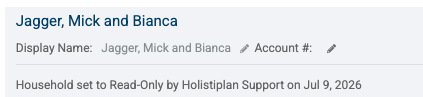
Navigate into a household from this page, and there will also be a note on the Details screen detailing the date that it was set to read-only and who performed that action.
Once a household is made read-only, it will not be possible to upload returns into that household, make edits to any existing scenarios, reports, or explainers, or edit the details within the actual household.