![Holistiplan Logo (800x200 px).webp]](https://help.holistiplan.com/hs-fs/hubfs/Holistiplan%20Logo%20(800x200%20px).webp?width=160&height=40&name=Holistiplan%20Logo%20(800x200%20px).webp)
How to Generate the Packet
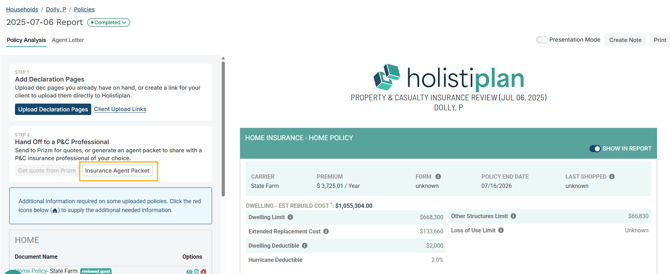
- From the client's household, open their P&C Report and go to the Policy Analysis tab.
- Under Step 2: Hand Off to a P&C Professional, click Insurance Agent Packet.
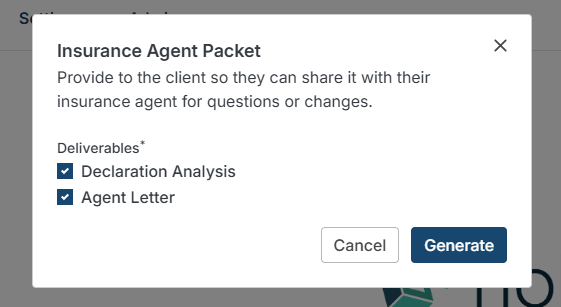
In the Insurance Agent Packet modal, select which deliverables to include:
- Declaration Analysis – a summary of the client's current coverage details
- Agent Letter – a letter with questions for the client to ask their insurance agent
- Click Generate.
Downloading the Packet
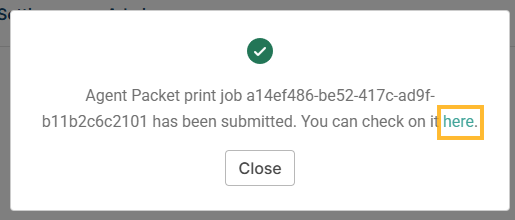
Once generated, a confirmation message appears with the print job ID and a link to check its status. Click here to go to the PDF Jobs page, where the job will show a status of success once it's ready.

Click View next to the job to download a zip file to your computer. The zip file contains two PDFs:
- Agent_Letter – the letter with questions for the insurance agent
- Insurance_Review – the declaration analysis summary
