![Holistiplan Logo (800x200 px).webp]](https://help.holistiplan.com/hs-fs/hubfs/Holistiplan%20Logo%20(800x200%20px).webp?width=160&height=40&name=Holistiplan%20Logo%20(800x200%20px).webp)
Ministers may also have additional Schedule C income from performing other services, like officiating weddings, funerals, etc.
Modeling SE Tax will vary depending on whether the client is considered an employee of the church or self-employed.
To illustrate this, we will use examples for our sample minister, Bob, showing three different types of income:
- Wages paid by the church
- Designated housing allowance
- Schedule C income from fees for performing services
The first example assumes Bob is considered an employee of the church, while the second example assumes he is self-employed.
Example 1: Bob is considered an employee of the church and has FICA (Social Security and Medicare payroll taxes) withheld from his wages
Bob is considered an employee of the church and has income as follows:
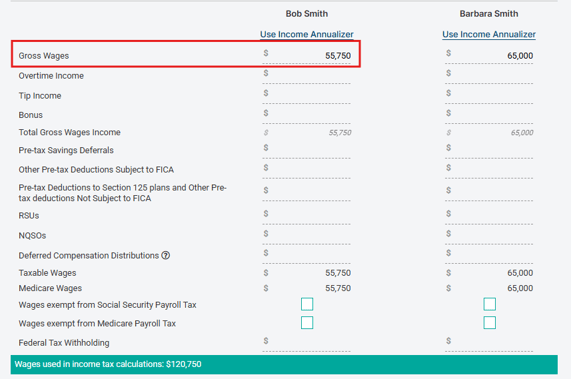
- $55,750 gross wages, FICA is withheld
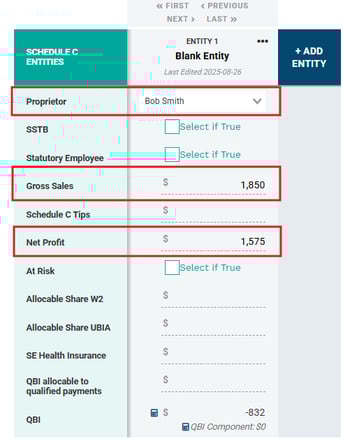
- $1,850 gross Schedule C income from officiating weddings; after expenses, net profit is $1,575
- $33,250 designated housing allowance
Wages
In the Wages Worksheet, enter “Gross Wages" of $55,750 for Bob. (learn more about the Wages Worksheet, here). As a best practice, enter income on a per-taxpayer basis and ensure any overrides are cleared to properly account for SE Tax.
Schedule C Income
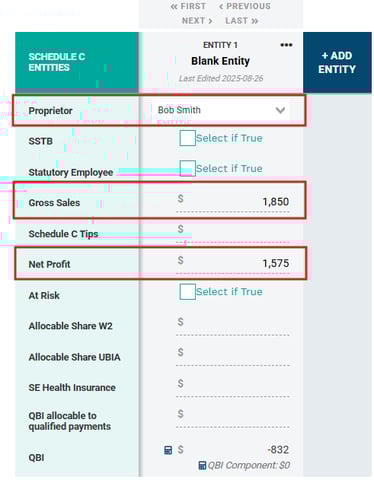
To add Schedule C Income, click on the pencil icon in the Schedule C field in the Schedule 1 Income section to open the Schedule C Entities Worksheet. Then select the appropriate taxpayer’s name from the dropdown. In this example, we entered “Gross Sales” of $1,850 and “Net Profit” of $1,575.
For more details on the Schedule C Worksheet, see our knowledge base article, here.
Housing Allowance
Ministerial income may include a designated housing allowance, which is generally exempt from federal income tax but subject to Self-Employment (SE) Tax. To account for this, navigate to and expand the Schedule SE - Self Employment Detail area of the Other Taxes section in Scenario Analysis and enter any housing allowance as “Other Self Employment Income."
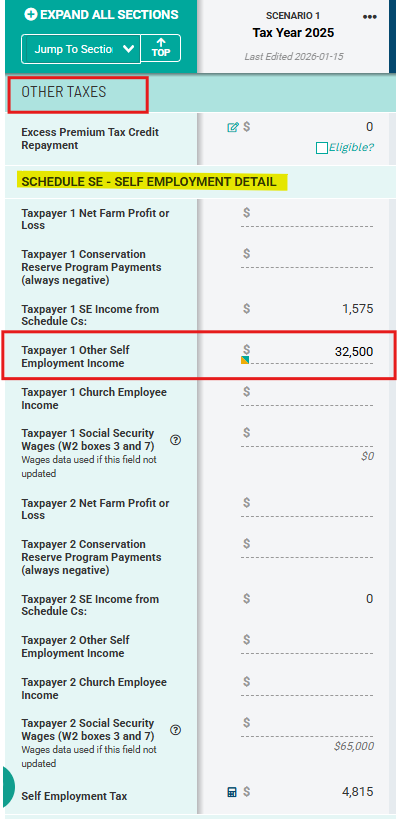
The $33,250 housing allowance is added under “Taxpayer 1” in this example because in the "Age / Filing Status / Dependents" section of Scenario Analysis, Bob is listed as Taxpayer 1. If he were Taxpayer 2, we would enter as “Taxpayer 2 Other Self Employment Income.”
In our example above, SE Tax totals $4,815, and is calculated based on Schedule C Income and the Housing Allowance.
Example 2: Bob is considered self-employed
Bob is considered self-employed and has income as follows:
- $55,750 gross wages, FICA is not withheld
- $33,250 designated housing allowance
- $1,850 gross Schedule C income from officiating wedding; after expenses, his net profit is $1,575
Wages
In the Wages Worksheet, we entered “Gross Wages” of $55,750 for Bob. We also checked the boxes that the wages are exempt from Social Security and Medicare Payroll Tax. This is important because, while the income is not technically exempt from these taxes, the IRS states that these taxes are paid via Schedule SE as SE Tax. Accordingly, we will make an adjustment to calculate self-employment tax on this income. Checking these boxes will indicate that FICA has not yet been withheld.
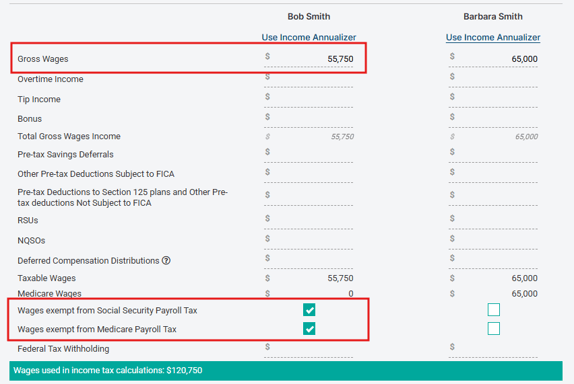
Enter income on a per-taxpayer basis and ensure any overrides are cleared to properly account for SE Tax.
Schedule C Income
To add Schedule C Income, open the Schedule C Entities Worksheet in the Schedule 1 Income section, select the appropriate taxpayer’s name from the dropdown. In this example, we entered “Gross Sales” of $1,850 and “Net Profit” of $1,575.
For more details on the Schedule C Worksheet, see our knowledge base article, here.
Housing Allowance / Wages Subject to SE Tax
Ministerial income may include a designated housing allowance, which is generally exempt from federal income tax but subject to Self-Employment (SE) Tax. In this example, Bob’s salary is subject to SE Tax because he is considered self-employed (and no FICA tax has been withheld).
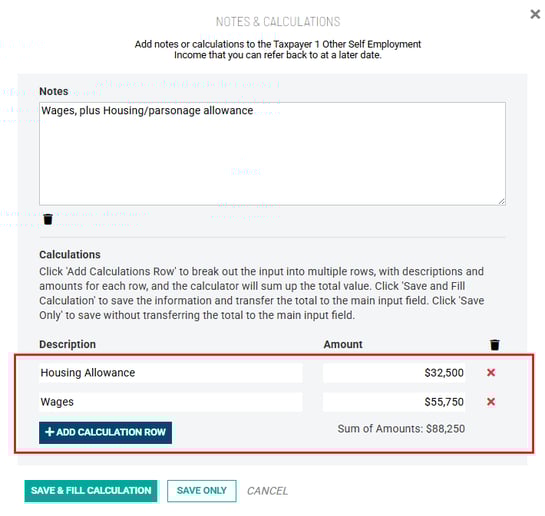
To account for this, navigate to and expand the Schedule SE - Self Employment Detail area of the Other Taxes section in Scenario Analysis and enter any housing allowance as “Other Self Employment Income." In our example here, the $88,250 as “Taxpayer 1 Other Self Employment Income” comes from the $33,250 of housing allowance plus $55,750 of wages. Use the calculation rows within Holistiplan's Field Notes feature to make a note of these two items for future reference.
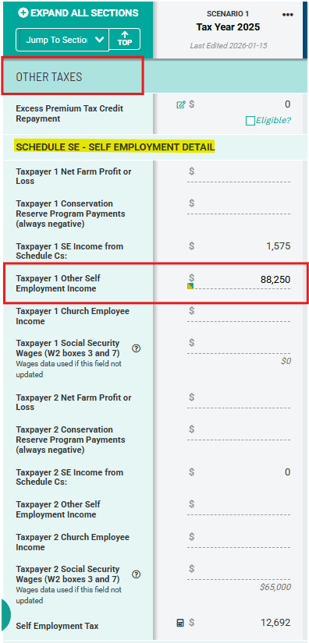
The $88,250 of "Other Self Employment Income" is added under “Taxpayer 1” in this example because in the "Age / Filing Status / Dependents" section of Scenario Analysis, Bob is listed as Taxpayer 1. If he were Taxpayer 2, we would enter as “Taxpayer 2 Other Self Employment Income.”
In our example above, SE Tax totals $12,692, and is calculated based on the wage income with no FICA withheld and the Housing Allowance.
Example of field note/calculation row data entry:
Additional IRS resources: