![Holistiplan Logo (800x200 px).webp]](https://help.holistiplan.com/hs-fs/hubfs/Holistiplan%20Logo%20(800x200%20px).webp?width=160&height=40&name=Holistiplan%20Logo%20(800x200%20px).webp)
While Holistiplan does read in Schedules B and E for informational purposes, interest and dividend income is drawn from lines 2 and 3 of Form 1040 and Schedule E income from line 5 of Schedule 1.
Accordingly, Schedules B / E are not verified by staff members, which may result in some incomplete or incorrectly read information in the Schedule B or E sections of the Tax Report. When this happens, manual adjustments can be made to the Schedule B / E in the View Document screen.
If an upload includes Form 1040 and an additional duplicate Form 1040—both accompanied by a Schedule B and/or E—please be aware that our OCR system will process and capture all data from both Schedules. As a result, line items may be duplicated.
Refining Data on Schedule B:
-
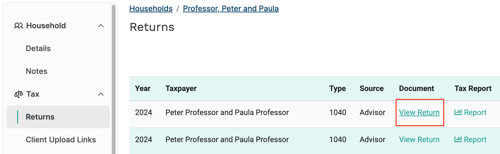
Select the household you would like to edit from the Households screen.
-
Navigate to the Returns tab under the Tax section and click View Return.
- Scroll down to the Schedule B section.
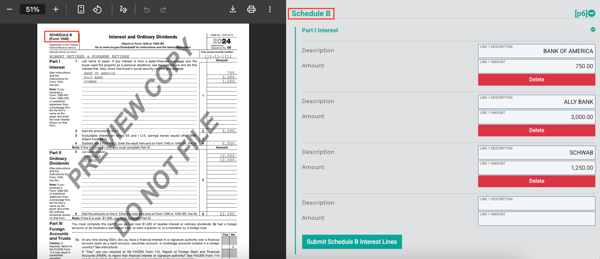
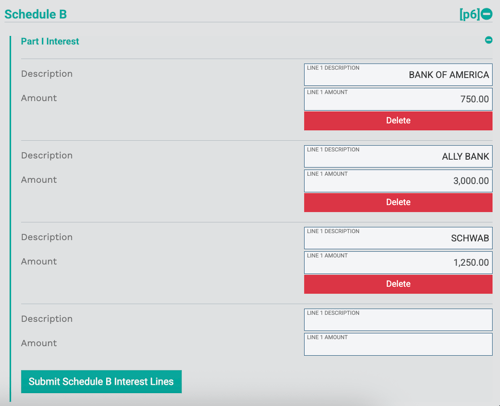
- After adjusting the data, click Submit Schedule B Lines to apply those changes to the Tax Report.
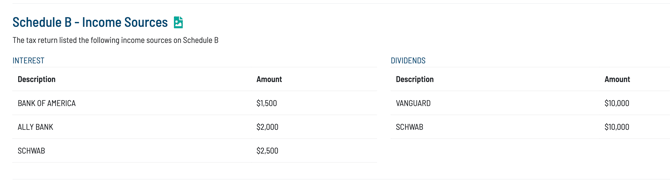
- These changes should reflect in the Tax Report and Schedule B reports.
Refining Data on Schedule E:
- Navigate to the Schedule E portion of the Document View screen.
- Note that only names of the Properties, Partnerships, and Trusts can be adjusted and not values reported on the Schedule E.
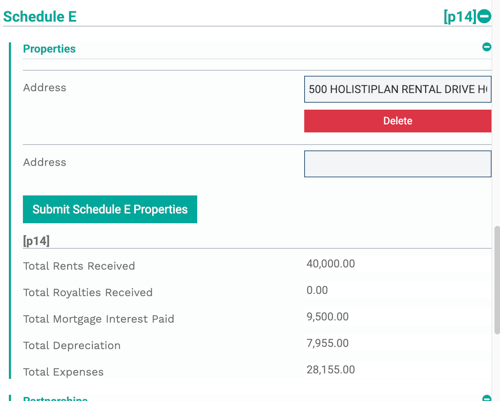
- After clicking Submit Schedule E, these changes should reflect in the Tax Report.
