![Holistiplan Logo (800x200 px).webp]](https://help.holistiplan.com/hs-fs/hubfs/Holistiplan%20Logo%20(800x200%20px).webp?width=160&height=40&name=Holistiplan%20Logo%20(800x200%20px).webp)
Self-employed individuals can contribute to a variety of employment-based retirement plans, including SEP-IRAs, Solo 401(k)s, SIMPLE IRAs, and even defined benefit plans (i.e., traditional pensions). When the taxpayer is the owner of the business filing a Schedule C as a sole proprietor or LLC (or a general partner reporting partnership income on Schedule E), those employer contributions are eligible for a deduction on the taxpayer's personal return.
Schedule C Businesses:
Sole Proprietorships, Qualified Joint Ventures, and Single-Member LLCs (also referred to as disregarded entities by the IRS), as well as contract "gig" workers that receive 1099s instead of W-2 wage income, generally record business activities on Schedule C.
Users trying to model scenarios involving self-employed retirement plan contributions for a Schedule C business should enter them in the Self-Employed Plans Worksheet, which is accessible by clicking the pencil icon in the Schedule 1 Deductions (Above the Line) section. Self-Employed Plan contributions also impact the calculation of Qualified Business Income (QBI), as noted in this article.
Contributions by the business to employees other than the owner should be reflected by adjusting the net profit reported on Schedule C.
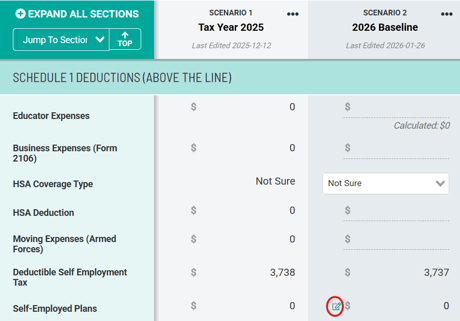
Clicking that icon will bring up the Self-Employed Plans Worksheet, where users can enter any self-employed plan contributions. 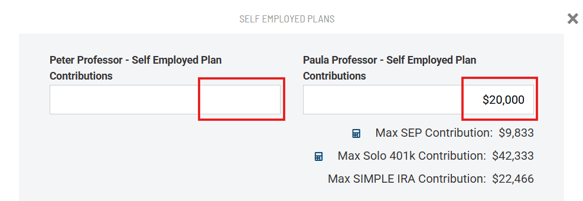
Within this worksheet, Holistiplan will display the maximum contributions to a SEP-IRA, Solo 401(k) Contribution, or SIMPLE IRA based on the entered amount of SE income. These limits reflect the Deduction Worksheet for Self-Employed individuals found in IRS Publication 560. To see the audit for the contribution calculations, click the calculator icons next to the corresponding contribution amount.
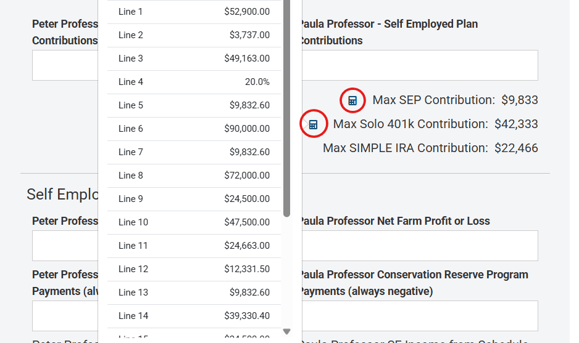
Note that any amount entered here will also display on the main Scenario Analysis screen in the Schedule 1 Deductions section. Holistiplan will also automatically back out any contribution amounts in determining the amount of Qualified Business Income for the resulting QBI Deduction.
If a SE plan contribution is entered and changes are later made to business income, please revisit this SE Plan Contributions section to ensure the entry is still within the max contribution limits.
If a client has multiple 401(k)s or SEP accounts, be mindful of the overall aggregate plan limits across plan types as stated by IRS §415(c).
This becomes more important if a client has both W-2 income and Schedule C income, as the calculation for the maximum Solo-401k contribution assumes both employer and employee contributions. If the taxpayer is already making contributions to a 401k/403b associated with a W-2 job, make appropriate adjustments to the max contribution to the Solo 401k, as Holistiplan will not automatically make that adjustment.
Defined Benefit Plans:
Business owners with high amounts of predictable business income can potentially achieve greater tax savings and larger contribution amounts by using a defined benefit plan. This is because contributions to these plans are not governed by annual maximums, but rather by the contribution necessary to maintain funded status for a specified benefit in retirement. While the benefit amount is capped at a certain amount, the amount necessary to contribute each year is not, as that amount depends on the plan's assets, return assumptions, benefit amounts, etc.
Holistiplan does not have a calculator to determine the annual funding amount for a defined benefit plan, as the plan sponsor needs to work with an actuary to determine the annual contribution amount each year. But once determined, the taxpayer will enter that amount in the same place as a contribution to a SEP IRA, Solo 401k, etc., namely in the "Self-Employed Plan Contribution" field in the Self-Employed Plans Worksheet in the Schedule 1 Deductions section of Scenario Analysis.
Schedule E: S-Corps
If the business in question is an S-Corp (or an LLC being taxed as an S-Corp), the employer portion of retirement plan contributions - including those made on behalf of the owner - are captured on the business return, which exists outside the scope of Holistiplan.
The net impact of those contributions, however, reduces Schedule E net income that will ultimately be captured on Schedule 1.
Users who are using the Schedule E override field to capture all Schedule E income can adjust that income by clicking on the pencil icon in the Schedule E income row and then updating the Schedule E box on the subsequent page.
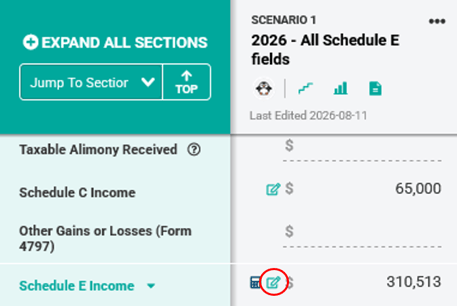
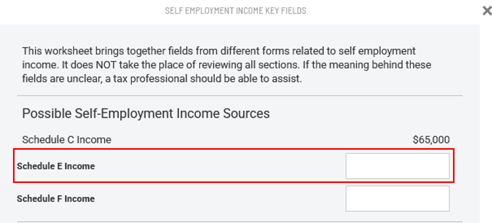
Use the calculation rows within our Field Notes feature to capture the composition of that net income.
That reduction in net income on Schedule E will also reduce QBI, so make sure to update the QBI entered in that section of Scenario Analysis, as well as adjusting the entry for the line 4b adjustment for active business income for the calculation of Net Investment Income (NIIT) in the Form 8960 area of the Other Taxes section in Scenario Analysis.
Note that this adjustment applies to employer contributions. For an S-corp shareholder employee, any employee contributions to self-employed retirement plans are reflected by adjustments to taxable wages from the business in the Wages Worksheet, which is accessible by clicking on the pencil icon next to Wages. For more information on modeling, retirement contributions in the Wages Worksheet, click here.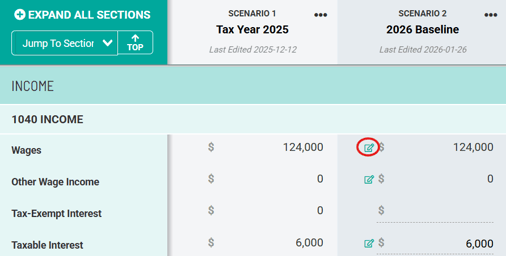
Alternatively, users can make use of the "per entity" worksheets in Schedule E to enter data in a more fine-tuned manner. In particular, the "Income Bridge" data entry method will indicate the maximum employer contribution for the S-corp.
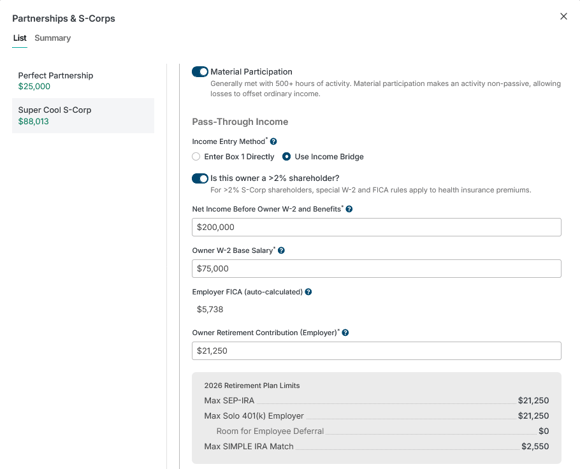
For more information, please see this article on S-Corporation income.
Schedule E: Partnerships
For partnerships where the taxpayer is a general partner, Holistiplan does not calculate the maximum employer contributions to any self-employed plan like we can with Schedule C entities.
The nature/choice of the underlying plan type determines what to display in Scenario Analysis:
- SEP and SIMPLE IRA contributions should be entered similarly to how they might be for Schedule C entities, with the contributions entered as deductions on Schedule 1. Note that these deductions will reduce the amount of QBI generated by the partnership.
- Solo 401k contributions are handled similarly to an S-corp, with the employer portion of the contribution recorded on the partnership business return. The employee portion of a solo 401k contribution for an active partner will be reflected in a lower distribution on Schedule E.