![Holistiplan Logo (800x200 px).webp]](https://help.holistiplan.com/hs-fs/hubfs/Holistiplan%20Logo%20(800x200%20px).webp?width=160&height=40&name=Holistiplan%20Logo%20(800x200%20px).webp)
For premium subscribers with access to Tax Letter functionality, we've created a staging screen to help with managing the Tax Letter project at a firm level.
To access the Tax Letter Staging Screen, Navigate to Tools & Resources > Tax Letter Staging, or click Tax Letter Staging from any client's Household screen to review the progress of all clients' Tax Letters.
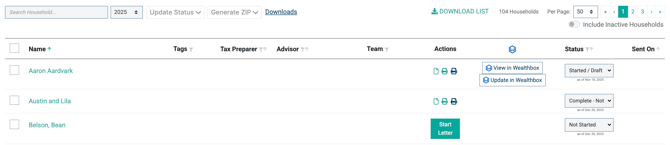
This screen will show:
- A listing of all households. Clicking on a household name takes you back to that specific household page for quick data entry
- Columns for Tags, Tax Preparer, Advisor, and Team Members associated with the household for easy filtering
- An Actions column which displays three buttons for created Tax Letters:
- View in New Tab
- Print Client Version
- Print CPA Version.
- If a Tax Letter hasn't been created for the selected year, this column will instead show Start Letter
- Links to the CRM connected if applicable
- A status for each Tax Letter to notate the progress of the letter for that year
Downloading Tax Letters in Bulk
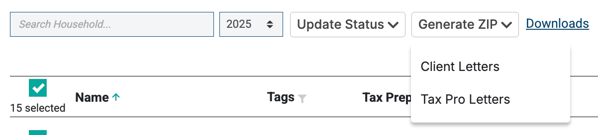
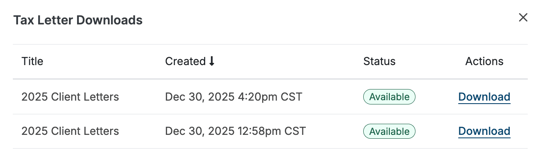
To download Tax Letters in bulk, select each household/letter to print, click Generate ZIP, and choose the type of Tax Letter to download. This will start a generation process to create a ZIP file of the selected Tax Letters.
Depending on the number of letters being generated, this may take a few minutes.
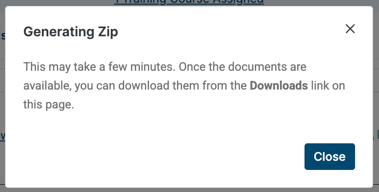
Feel free to nevigate to another page within the site - we'll notify you when the download is complete!

Navigate back to the Tax Letter Staging screen, Click on the Downloads link, and download the ZIP file you'd like.

Updating Tax Letter Statuses in Bulk
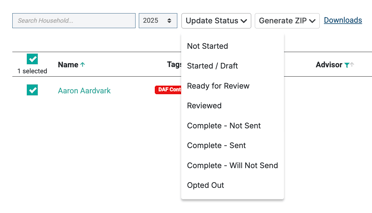
Update the status of Tax Letters in bulk by selecting the households and choosing the new status from the Update Status dropdown.