![Holistiplan Logo (800x200 px).webp]](https://help.holistiplan.com/hs-fs/hubfs/Holistiplan%20Logo%20(800x200%20px).webp?width=160&height=40&name=Holistiplan%20Logo%20(800x200%20px).webp)
Holistiplan's Tax Letter allows users to document tax related activities over the course of the year, providing easy documentation for clients and their tax preparers when it comes time to file that year's return.
Each Tax Letter section includes an editable field that indicates how that activity should be referenced in the Tax Report so that advisors can verify the activity was correctly reported on a client's tax return. For example, a 2025 Tax Letter can inform the Tax Report for the 2025 tax return once uploaded to Holistiplan.
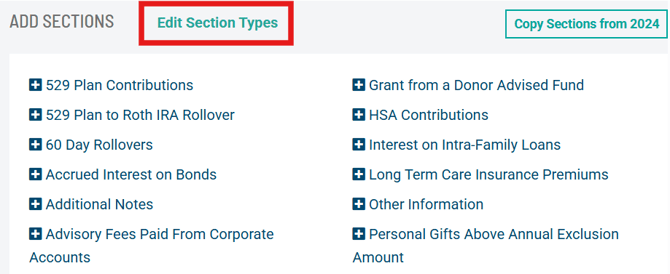
Tax Letter Checks are accessed and customized by a firm admin by clicking "Edit Section Types" on a Tax Letter then on the three dots under "Actions" for each specific section.
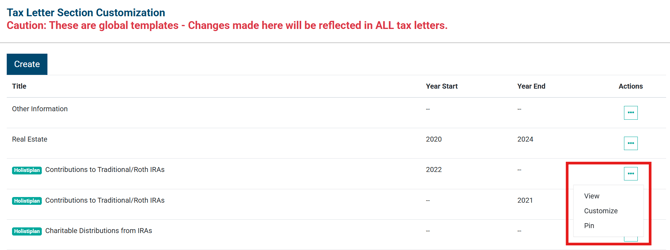
The "Contributions to Traditional/Roth IRAs" section below includes Holistiplan's default Tax Letter Checks text in the How should this section be referenced in the resulting Tax Report field. This text can be customized by altering the text directly in the text box.
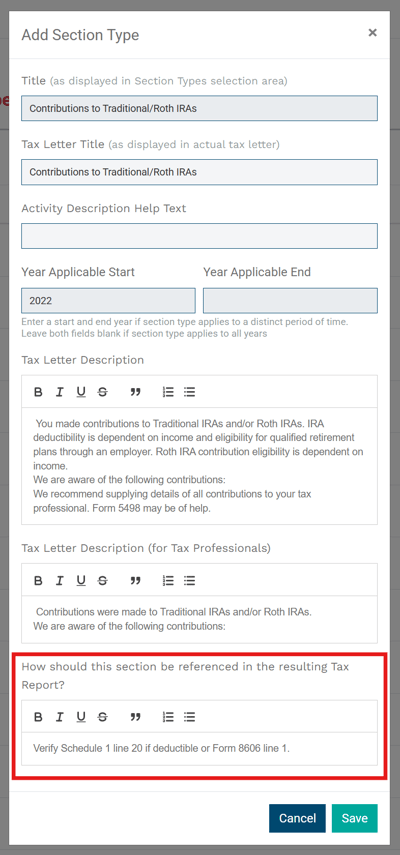
This text will then be seen in the Tax Letter Checks section of the Tax Report in the accompanying tax year.
