![Holistiplan Logo (800x200 px).webp]](https://help.holistiplan.com/hs-fs/hubfs/Holistiplan%20Logo%20(800x200%20px).webp?width=160&height=40&name=Holistiplan%20Logo%20(800x200%20px).webp)
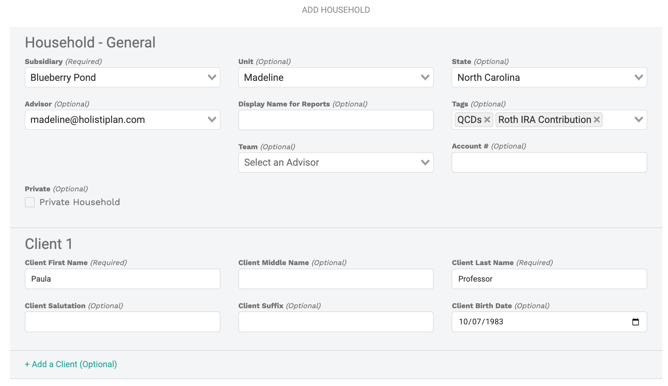
To create a new household, select Households to navigate to the all Households page and click the teal Add Household button.

If this household is your personal household, you can indicate that it's a Private Household by checking the corresponding box.
First and last name of the primary taxpayer are the only two fields required, but as a best practice, we encourage users to enter birth dates as well to drive those age-related milestones, age reminders, the age 65+ additional standard deduction amount, and other age-related calculations.
To add a second client, click the "Add a Client (Optional)" link. This is strongly encouraged for returns with 2 taxpayers to allow our system to associate each taxpayer on uploaded returns with a client in the system.
Finally, at the point of creation, you will want to consider if you would like to create an active household right away or create the household in "read-only" mode first.
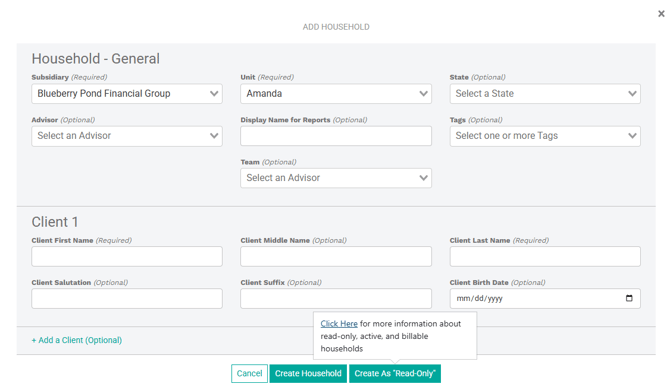
Please be mindful, that creating a household as active to start, will immediately count it as a "billable" household, whereas, creating a household in "read-only" mode first, will allow you to add a household without charging it against the billable household count for the subscription period.
For example, starting a household in "read-only" mode is a great alternative if you are curious about adding your [prospective] client's household and gathering the tax return before it would count as a "billable" household. More on that here: Household Billing
As always, if you have any questions, please reach out to the Support team through your "Help" tab at the top of the page.