---
title: Equity Compensation (e.g., RSUs, ESPPs, NQSOs, ISOs, etc.) in Scenario Analysis
description: In this article, we'll explore how to enter equity compensation income and subsequent sales of that company stock within Scenario Analysis. Our video below (timestamps in parentheses) walks through ho
---
[Skip to content](https://help.holistiplan.com/how-do-i-handle-equity-compensation-e.g.-nqsos-isos-rsus-etc.-in-scenario-analysis#main-content)
English
Show submenu for translations
[More support](https://help.holistiplan.com/kb-tickets/new?hsLang=en)
[![Holistiplan Logo (800x200 px).webp\]](https://help.holistiplan.com/hs-fs/hubfs/Holistiplan%20Logo%20(800x200%20px).webp?width=160&height=40&name=Holistiplan%20Logo%20(800x200%20px).webp)](https://www.holistiplan.com/)
Open main navigation
Close main navigation
- English
Show submenu for translations
- [More support](https://help.holistiplan.com/kb-tickets/new)
Holistiplan Knowledge Base
- There are no suggestions because the search field is empty.
1. [Help Center](https://help.holistiplan.com/?hsLang=en)
2. [Scenario Analysis](https://help.holistiplan.com/scenario-analysis?hsLang=en)
3. [Equity Compensation](https://help.holistiplan.com/scenario-analysis?hsLang=en#equity-compensation)
# Equity Compensation (e.g., RSUs, ESPPs, NQSOs, ISOs, etc.) in Scenario Analysis
In this article, we'll explore how to enter equity compensation income and subsequent sales of that company stock within Scenario Analysis. Our video below walks through how to enter each type of equity compensation.
- [Stock Grant Bonus (03:35 in video)](https://help.holistiplan.com/how-do-i-handle-equity-compensation-e.g.-nqsos-isos-rsus-etc.-in-scenario-analysis#stock-grant_and_RSUs)
- [Restricted Stock Units - RSUs (10:17)](https://help.holistiplan.com/how-do-i-handle-equity-compensation-e.g.-nqsos-isos-rsus-etc.-in-scenario-analysis#stock-grant_and_RSUs)
- [Nonqualified Stock Options - NQSOs (14:52)](https://help.holistiplan.com/how-do-i-handle-equity-compensation-e.g.-nqsos-isos-rsus-etc.-in-scenario-analysis#NQSOs)
- [Incentive Stock Options - ISOs:](https://help.holistiplan.com/how-do-i-handle-equity-compensation-e.g.-nqsos-isos-rsus-etc.-in-scenario-analysis#ISOs)
- [Qualified Disposition (19:56)](https://help.holistiplan.com/how-do-i-handle-equity-compensation-e.g.-nqsos-isos-rsus-etc.-in-scenario-analysis#qualified-disposition)
- [Disqualifying Disposition (40:15)](https://help.holistiplan.com/how-do-i-handle-equity-compensation-e.g.-nqsos-isos-rsus-etc.-in-scenario-analysis#disqualifying-disposition)
- [Employee Stock Purchase Plans - ESPPs (46:45)](https://help.holistiplan.com/how-do-i-handle-equity-compensation-e.g.-nqsos-isos-rsus-etc.-in-scenario-analysis#ESPP)
For a deeper dive on the basics of equity compensation, check out the hour-long [webinar and slides](https://help.holistiplan.com/how-do-i-handle-equity-compensation-e.g.-nqsos-isos-rsus-etc.-in-scenario-analysis#taxation-video) at the bottom of this article hosted by Ben Birken, our VP of Customer Success and Engagement.
Understanding the timing of income from equity compensation is a critical first step in modeling that income. Equity compensation awards typically originate from a grant letter. This generally will have details such as the vesting schedule, any expiration dates for options, and other important information. Using that information to map out the timing of income is a good first step to understanding the tax picture of a client's equity compensation.
While there are similarities in *how* equity compensation is taxed, one big difference is *when* those taxes are applied. Equity compensation includes either a grant of shares or options to exercise the right to purchase shares of company stock. So, when does equity compensation get recognized as income? There are generally two trigger points:
- Stock **GRANTS** are taxed when the stock ***Vests***.
- Stock **OPTIONS** are taxed when the stock option is ***Exercised***.
**Stock Grants and Restricted Stock Units (RSUs):**
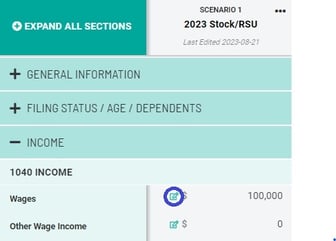
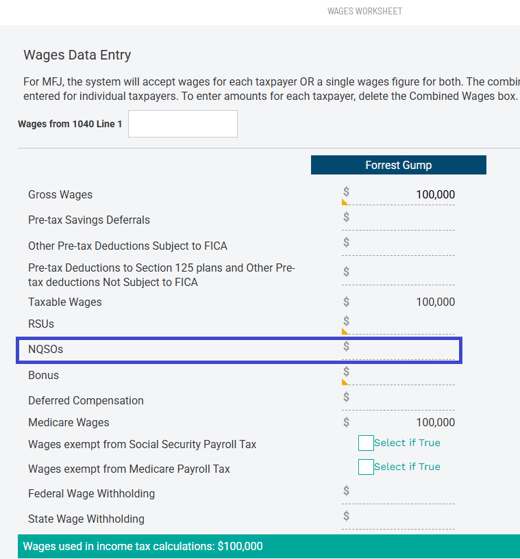
Income from stock grants, restricted stock units (RSUs), and non-qualified stock options (NQSOs) is all included as wage income and taxable for income tax purposes and payroll taxes (FICA) on a taxpayer's W-2. Income from stock grants, RSUs, or NQSOs is entered in the **Wages Worksheet** within Scenario Analysis. Access that worksheet by clicking on the pencil icon.
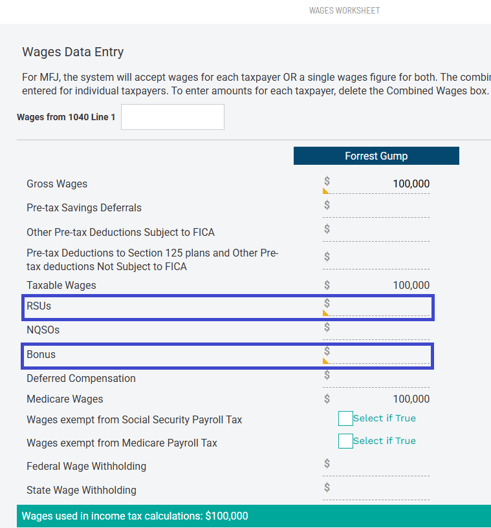
When a stock is granted to an employee, the stock is considered taxable income (both for income taxes and for payroll (or FICA) taxes when that stock vests. The income recognized is equal to the fair market value (FMV) of the shares on that vest date times the number of shares vesting. That income is entered in the Wages Worksheet fields outlined in blue below for stock grants (bonus) or RSUs, respectively.
Below is an example of 500 shares of RSUs vesting with a subsequent sale:
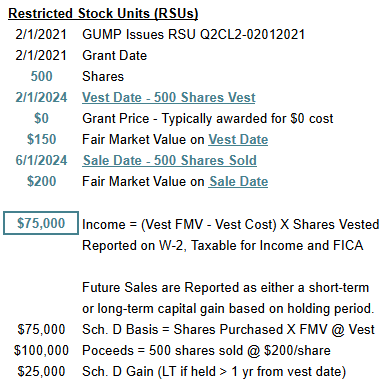
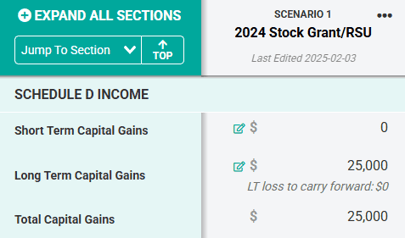
When selling those shares of stock, the gain is taxed as any other stock gain - a short-term or long-term (if held from one year after acquisition - the *vest date*) capital gain based on the holding period of the stock upon sale. The basis per share is equal to the FMV per share at vesting, and any net gain/loss from the sale is entered in the **Schedule D Income** section of Scenario Analysis.
**Non-Qualified Stock Options (NQSOs):**
Stock options are taxed not when the option vests, but rather when the owner exercises that option to purchase shares. The difference between the market price of the stock on the date of exercise and the "strike" price of the option - referred to as the bargain element or "spread" - is taxable income, with the total amount of taxable income being equal to the spread times the number of options exercised. Enter that income in the **Wages Worksheet** field. Below is an example of exercising 500 shares of NQSOs and subsequently selling those NQSOs:
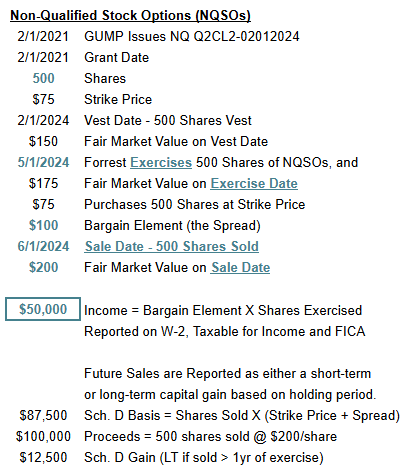
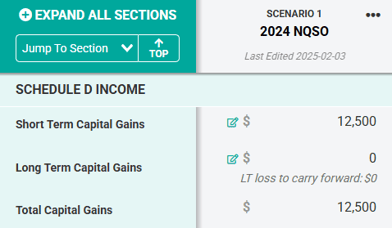
When selling those shares of stock, the gain is taxed as any other stock gain - a short-term or long-term (if held from one year after acquisition - the *exercise date*) capital gain based on the holding period of the stock upon sale. The basis per share for these NQSOs is equal to (the strike price times + the bargain element). Enter any net gain/loss from the sale in the **Schedule D Income** section of Scenario Analysis.
---
**Incentive Stock Options (ISOs):**
**Note:** If you are modeling capital gains that include both ISO-related gains/losses and non-ISO-related gains/losses, you must first manually separate out the ISO-related shares and non-ISO-related shares. Tracking these gains separately within a spreadsheet is often the best way to track the different lots at play.
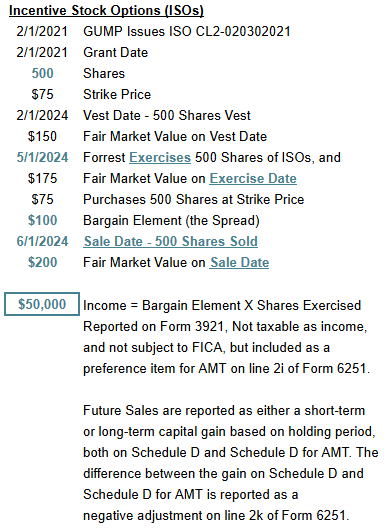
Below is an example of exercising 500 shares of ISOs. The disposition or sale of those shares of ISOs is modeled differently depending on whether that sale is a [qualified disposition](https://help.holistiplan.com/how-do-i-handle-equity-compensation-e.g.-nqsos-isos-rsus-etc.-in-scenario-analysis#qualified-disposition) or a [disqualifying disposition](https://help.holistiplan.com/how-do-i-handle-equity-compensation-e.g.-nqsos-isos-rsus-etc.-in-scenario-analysis#disqualifying-disposition) (both discussed later).
Qualified Disposition:
What makes the disposition (sale) of ISOs qualified, and why does it matter? The reason it matters is that there is a distinction between how ISOs are taxed, depending on whether those ISOs are sold as a qualified disposition or a disqualifying disposition. A qualified disposition occurs when ISOs are exercised in one tax year and then sold:
1. more than one year after the exercise date (in another tax year), and
2. more than two years after the grant date (when the shares were awarded).
A disqualifying disposition is a sale of ISO shares that fails to meet both of the requirements of a qualified disposition mentioned above. Since they are treated differently for taxes, how you model ISOs in Holistiplan depends on whether the sale of those ISOs is a qualified disposition or a disqualifying disposition. Below is an example of what selling those 500 exercised ISO shares as a qualifying disposition would look like:
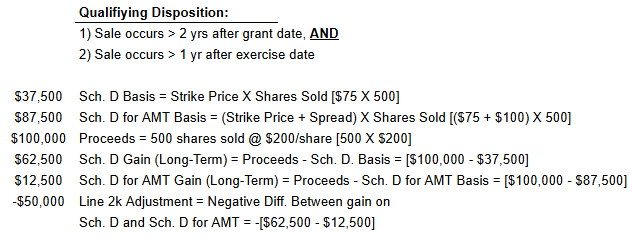
While the exercise of ISOs is not taxable under the regular tax calculation (except in the case of disqualifying dispositions - covered later), there is an impact under the AMT calculation on [Form 6251](https://www.irs.gov/pub/irs-pdf/f6251.pdf). Therefore, no income must be recognized in the regular tax calculation, and **no entry is made in the Wages Worksheet when exercising an ISO**.
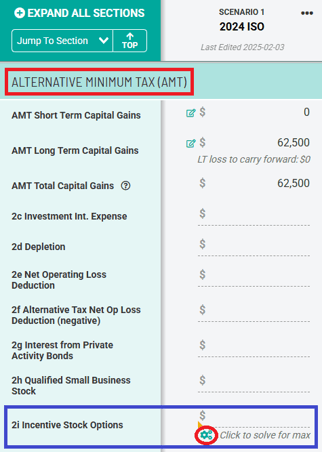
However, the difference between the market price and the exercise price (the bargain element or the *spread*) is a preference item for Alternative Minimum Tax (AMT). To model ISO exercises and the impact on AMT, navigate to the **Alternative Minimum Tax** section and enter the amount of the preference item (the bargain element per share times the number of shares exercised) in the row titled **2i Incentive Stock Options** outlined in blue below. Click the **Solve for Max** gear icon to determine how much of a preference item a client can have from exercising ISOs and still avoid AMT!
When selling those ISOs as part of a qualified disposition, the gain on those ISOs is, by its very nature, taxed as a long-term capital gain. However, the entries to record the sale of that stock have to be made in three separate places:
1. **Schedule D** - to reflect the capital gain under the regular tax calculation,
2. **Schedule D for AMT** - to reflect the gain under the AMT tax calculation, and
3. **Form 6251** - to reflect the negative adjustment for disposition of property on line 2k.
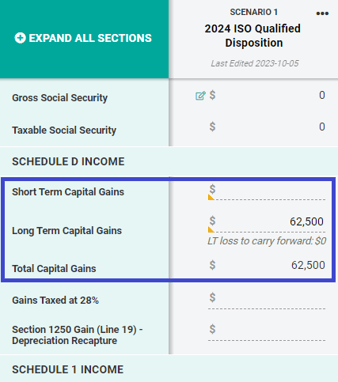
The basis per share under the regular tax calculation of these ISOs is the strike price. Enter any net gain/loss from the sale in the **Schedule D Income** section of Scenario Analysis like a normal sale of stock, with the proceeds less the basis equaling the net gain.
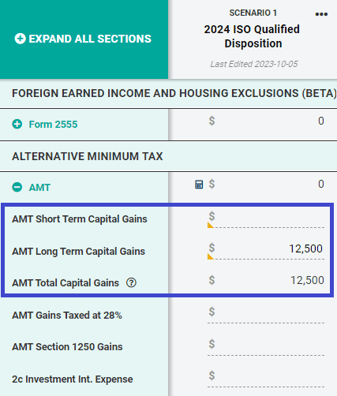
The basis under the calculation of Schedule D for AMT adds one other component - the bargain element - to the calculation, so the basis per share under the AMT calculation for these ISOs would be the (strike price + the bargain element (FMV at exercise minus the strike price)). This higher basis under the AMT calculation will result in a lower gain/loss when compared to the gain/loss under the regular tax calculation. Enter that AMT short-term or long-term gain/loss in the area outlined below.
Once the gain/loss is entered accurately in both the regular **Schedule D Income** section and the **AMT Capital Gains** section, enter, as a negative number, the difference between the gain/loss under the regular tax calculation and the gain/loss under the AMT calculation. This negative difference is what should be entered as the **Disposition of Property** adjustment on line 2k within the AMT section. The formula for this adjustment on line 2k is:
-(gain/loss under the regular tax calculation - gain/loss under the AMT calculation)
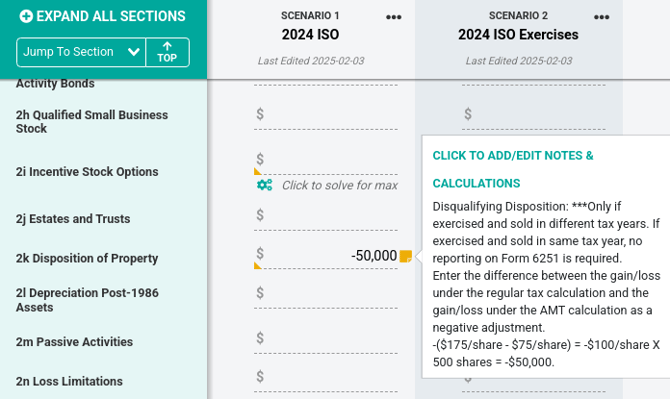
Remember, capital losses are capped at $3,000, both under the regular tax calculation and under the AMT tax calculation. Accordingly, factor that into the line 2k adjustment. See the examples on page 4 of the [Form 6251 Instructions](https://www.irs.gov/pub/irs-pdf/i6251.pdf) that speak to this limitation.
---
Disqualifying Disposition:
Modeling a disqualifying disposition of ISO shares is very similar to how an NSO would be modeled, with one exception - disqualifying dispositions of ISOs are not subject to payroll (FICA) taxes like NSOs are. Therefore, there is a slight difference in how to model them. To show the income recognized from the exercise of an ISO later sold in a disqualifying disposition, enter the difference between the fair market value at exercise and the exercise (strike) price (the bargain element or the spread) as an income item in the **Other Income** **Worksheet.**
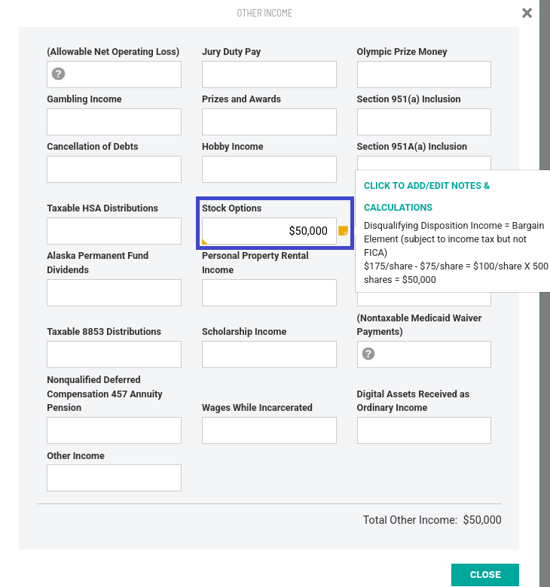
Enter that spread as income in the **Stock Options** field outlined above within the **Other Income Worksheet**. Below is an example of what selling those 500 exercised ISO shares as a disqualifying disposition would look like.
**HOLISTINOTE:** Sometimes a disqualifying disposition will be in the form of an exercise and sale, where an exercise is followed immediately by a sale of those same stock shares. This will likely not have any Schedule D Income implications, and in that case, no Schedule D Income need be entered.
However, if there is a gain/loss between the timing of the exercise and sale transactions, those may generate a small amount of short-term gains/losses, which can be reported in the Schedule D Income section as shown below.
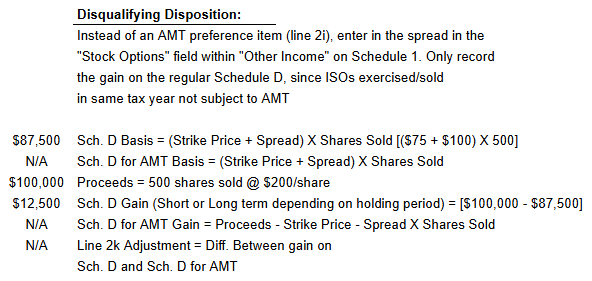
When selling those shares of stock, the gain is taxed as any other stock gain - a short-term or long-term (if held from one year after acquisition - the *exercise date*) capital gain based on the holding period of the stock upon sale. The basis for these shares is equal to the cost to acquire the shares (the strike price times the number of shares exercised). Enter any net gain/loss from the sale in the **Schedule D Income** section of Scenario Analysis.
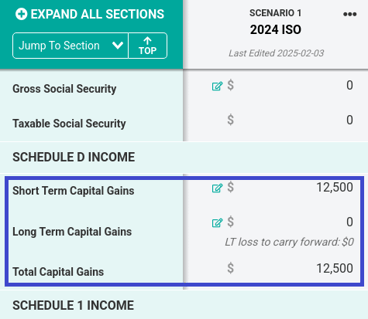
If the sale of ISO shares related to a disqualifying disposition occurs in the same tax year as the exercise of those ISO shares, no reporting on Form 6251 is required. This is typically the case when utilizing a disqualifying disposition to exercise and immediately sell ISO shares to avoid AMT.
If the exercise and sale of ISO shares happen in different tax years, in addition to recording the sale on Schedule D for the regular tax calculation, report the sale on **Schedule D for AMT** (to reflect the gain under the AMT tax calculation) and as a negative adjustment for disposition of property on **line 2k** in the **AMT** section of Scenario Analysis.
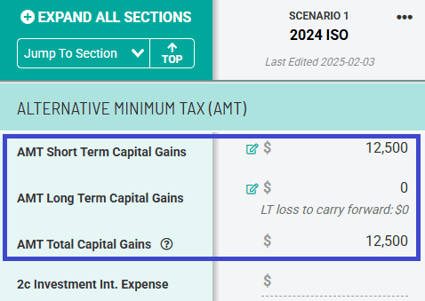
As a final step, once the gain/loss is entered accurately in both the regular **Schedule D Income** section and the **AMT Capital Gains** section, enter, as a negative number, the difference between the gain/loss under the regular tax calculation and the gain/loss under the AMT calculation. This negative difference is what should be entered as the **Disposition of Property** adjustment on **line 2k** within the AMT section. The formula for this adjustment on line 2k is:
-(gain/loss under the regular tax calculation - gain/loss under the AMT calculation)
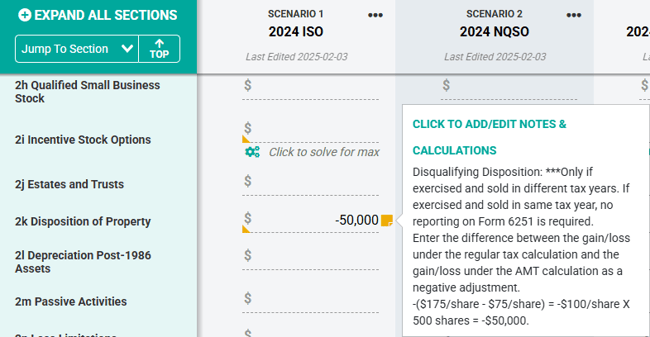
Remember, capital losses are capped at $3,000, both under the regular tax calculation and under the AMT tax calculation. Accordingly, factor that into the line 2k adjustment. See the examples on page 4 of the [Form 6251 Instructions](https://www.irs.gov/pub/irs-pdf/i6251.pdf) that speak to this limitation.
---
**Employee Stock Purchase Plans (ESPPs):**
ESPPs afford an employee to purchase company stock at a discount (15% is common) by electing an annual amount they wish to contribute via payroll deductions. At pre-determined times during the plan year, the plan purchases shares of stock using money the employee contributed to the plan. While the decision to participate leads to payroll deductions for the employee, taxation under an ESPP does not occur when the shares of stock are offered or purchased, but rather when those shares are eventually sold. Below is an example of $5,000 worth of ESPP shares being purchased and later sold:
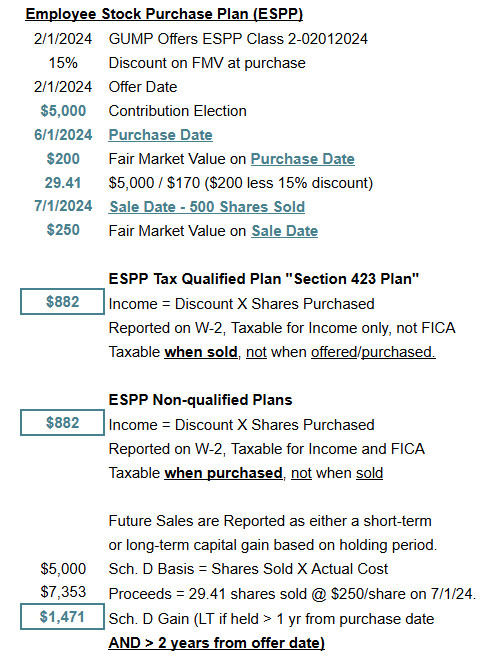
There are two different types of ESPP Plans, and tax treatment varies for each of them. Most ESPP plans are qualified.
*ESPP Tax Qualified Plan "Section 423 Plan"*
\- No income for tax purposes when shares are purchased, only later when shares are sold
\- The amount and type of income earned (ordinary or qualified) depend on how long shares are held
\- FICA does not apply at purchase or sale of ESPP shares
*ESPP Non-qualified Plans*
\- The discount element is classified as ordinary income at the time of purchase
\- FICA applies only at purchase, not sale
To qualify for long-term capital gains treatment, the ESPP shares in a **qualified plan** must be held **BOTH**:
1. More than one year from the purchase date, **AND**
2. More than two years from the offer date.
To record ESPP income/gains in Holistiplan, for qualified plans, enter the portion of the gain representing the discount on the shares in the **Deferred Compensation Distributions** field, as we do not have a field specifically for the discount element of qualified ESPP shares. Using this field ensures the correct tax treatment, as the income would be included in ordinary income and excluded from FICA. It is encouraged to use a **[Field Note](https://help.holistiplan.com/field-notes?hsLang=en)** here to indicate the use of this field as a workaround for entering the discount element of ESPP shares for qualified plans. Any remaining gain in the **Schedule D Income** section, as either a short-term or long-term capital gain, as appropriate.
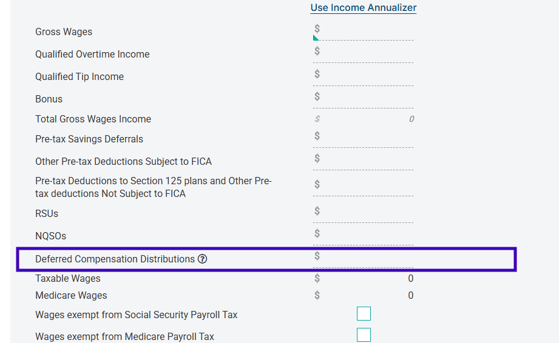
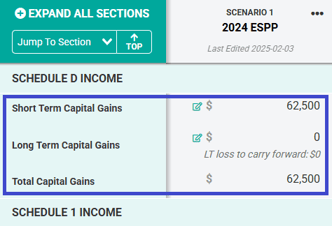
To capture ordinary income and FICA for non-qualified plans, there are no additional steps that need to be taken beyond entering income as wages, as the discount element of the ESPP would be reported on the taxpayer's Form W-2 and already included in their wages in the year of purchase.
---
### Taxation of Equity Compensation
[Slides - Taxation of Equity Compensation](https://drive.google.com/file/d/1qjTmccjWfK2erA6T5YMDxSRvBFRYvzB-/view?usp=share_link)
- [Getting Started at Holistiplan](https://help.holistiplan.com/getting-started-at-holistiplan?hsLang=en#main-content)
- [How to Contact Support](https://help.holistiplan.com/getting-started-at-holistiplan?hsLang=en#how-to-contact-support)
- [Ready to Get Started?](https://help.holistiplan.com/getting-started-at-holistiplan?hsLang=en#ready-to-get-started)
- [Getting Started with Your Households](https://help.holistiplan.com/getting-started-at-holistiplan?hsLang=en#getting-started-with-your-households)
- [Tax Report](https://help.holistiplan.com/getting-started-at-holistiplan?hsLang=en#tax-report)
- [Scenario Analysis](https://help.holistiplan.com/getting-started-at-holistiplan?hsLang=en#scenario-analysis)
- [Master Your Dashboard](https://help.holistiplan.com/getting-started-at-holistiplan?hsLang=en#master-your-dashboard)
- [Tips for New Users](https://help.holistiplan.com/getting-started-at-holistiplan?hsLang=en#tips-for-new-users)
- [Deeper Dive at Holistiplan - 201](https://help.holistiplan.com/deeper-dive-at-holistiplan-201?hsLang=en#main-content)
- [Mastering the Tax Report: Advanced Insights and Analysis](https://help.holistiplan.com/deeper-dive-at-holistiplan-201?hsLang=en#mastering-the-tax-report-advanced-insights-and-analysis)
- [Advanced Planning with Scenario Analysis](https://help.holistiplan.com/deeper-dive-at-holistiplan-201?hsLang=en#advanced-planning-with-scenario-analysis)
- [Roth Projection Tool](https://help.holistiplan.com/deeper-dive-at-holistiplan-201?hsLang=en#roth-projection-tool)
- [Using the Tax Explainer](https://help.holistiplan.com/deeper-dive-at-holistiplan-201?hsLang=en#using-the-tax-explainer)
- [Tax Letter- Adding Value for Your Clients](https://help.holistiplan.com/deeper-dive-at-holistiplan-201?hsLang=en#tax-letter-adding-value-for-your-clients)
- [Holistiplan Basics](https://help.holistiplan.com/holistiplan-basics?hsLang=en#main-content)
- [Uploading Returns](https://help.holistiplan.com/holistiplan-basics?hsLang=en#uploading-returns)
- [Household Information](https://help.holistiplan.com/holistiplan-basics?hsLang=en#household-information)
- [Tools & Resources](https://help.holistiplan.com/holistiplan-basics?hsLang=en#tools-resources)
- [Firm Admins](https://help.holistiplan.com/holistiplan-basics?hsLang=en#firm-admins)
- [Holistiplan Academy - Upload Breakdown](https://help.holistiplan.com/holistiplan-academy-upload-breakdown?hsLang=en#main-content)
- [Tax Report](https://help.holistiplan.com/holistiplan-academy-upload-breakdown?hsLang=en#tax-report)
- [Scenario Analysis](https://help.holistiplan.com/holistiplan-academy-upload-breakdown?hsLang=en#scenario-analysis)
- [Billing and Subscriptions](https://help.holistiplan.com/billing-and-subscriptions?hsLang=en)
- [User Admin](https://help.holistiplan.com/user-admin?hsLang=en)
- [Tax Reports](https://help.holistiplan.com/tax-reports?hsLang=en#main-content)
- [Tax Report FAQ](https://help.holistiplan.com/tax-reports?hsLang=en#tax-report-faq)
- [Scenario Analysis](https://help.holistiplan.com/scenario-analysis?hsLang=en#main-content)
- [General Administration and Editing](https://help.holistiplan.com/scenario-analysis?hsLang=en#general-administration-and-editing)
- [Business Income](https://help.holistiplan.com/scenario-analysis?hsLang=en#business-income)
- [Charitable Giving Strategies](https://help.holistiplan.com/scenario-analysis?hsLang=en#charitable-giving-strategies)
- [Credits and Deductions](https://help.holistiplan.com/scenario-analysis?hsLang=en#credits-and-deductions)
- [Equity Compensation](https://help.holistiplan.com/scenario-analysis?hsLang=en#equity-compensation)
- [Filing Status](https://help.holistiplan.com/scenario-analysis?hsLang=en#filing-status)
- [Range Calc/Solve for Max](https://help.holistiplan.com/scenario-analysis?hsLang=en#range-calc-solve-for-max)
- [Retirement Plan Contributions and Distributions](https://help.holistiplan.com/scenario-analysis?hsLang=en#retirement-plan-contributions-and-distributions)
- [Roth Conversions](https://help.holistiplan.com/scenario-analysis?hsLang=en#roth-conversions)
- [State Taxes](https://help.holistiplan.com/scenario-analysis?hsLang=en#state-taxes)
- [Strategy Illustrations](https://help.holistiplan.com/scenario-analysis?hsLang=en#strategy-illustrations)
- [Wages](https://help.holistiplan.com/scenario-analysis?hsLang=en#wages)
- [Scenario Analysis FAQ](https://help.holistiplan.com/scenario-analysis?hsLang=en#scenario-analysis-faq)
- [Supplemental Income](https://help.holistiplan.com/scenario-analysis?hsLang=en#supplemental-income)
- [Roth Projection Tool](https://help.holistiplan.com/roth-projection-tool?hsLang=en)
- [Tax Letters](https://help.holistiplan.com/tax-letters?hsLang=en)
- [Explainer Reports](https://help.holistiplan.com/explainer-reports?hsLang=en)
- [P&C Insurance Planning](https://help.holistiplan.com/pc-insurance-planning?hsLang=en#main-content)
- [Basics](https://help.holistiplan.com/pc-insurance-planning?hsLang=en#basics)
- [Getting Started](https://help.holistiplan.com/pc-insurance-planning?hsLang=en#getting-started)
- [Features/Additional Information](https://help.holistiplan.com/pc-insurance-planning?hsLang=en#features-additional-information)
- [Integrations](https://help.holistiplan.com/integrations?hsLang=en#main-content)
- [Single Sign-On](https://help.holistiplan.com/integrations?hsLang=en#single-sign-on)
- [API](https://help.holistiplan.com/integrations?hsLang=en#api)
- [CRM Integrations](https://help.holistiplan.com/integrations?hsLang=en#crm-integrations)
- [Integrations](https://help.holistiplan.com/integrations?hsLang=en#integrations)
- [Security](https://help.holistiplan.com/security?hsLang=en)
- [Tax Transcripts](https://help.holistiplan.com/tax-transcripts?hsLang=en)
Copyright © 2025, Holistiplan LLC
```json
{
"@context" : "https://schema.org",
"@type" : "VideoObject",
"contentUrl" : "https://stream.mux.com/Ifept1NvfNlhVahgBjZwsCOcSOvpvXYjajUdMxF3IkM/capped-1080p.mp4",
"dateModified" : "2025-07-08T19:34:10.499Z",
"duration" : "PT55M26S",
"height" : 1080,
"name" : "GMT20250212-180347_Recording_1920x1080",
"thumbnailUrl" : "https://8752285.fs1.hubspotusercontent-na1.net/hubfs/8752285/GMT20250212-180347_Recording_1920x1080.mp4/medium.jpg",
"uploadDate" : "2025-07-08T19:33:58.533Z",
"width" : 1920
}
```